BrickGPTBrickGPT
Assembly Video Maker

A brick assembly video maker that starts from one finished model image.

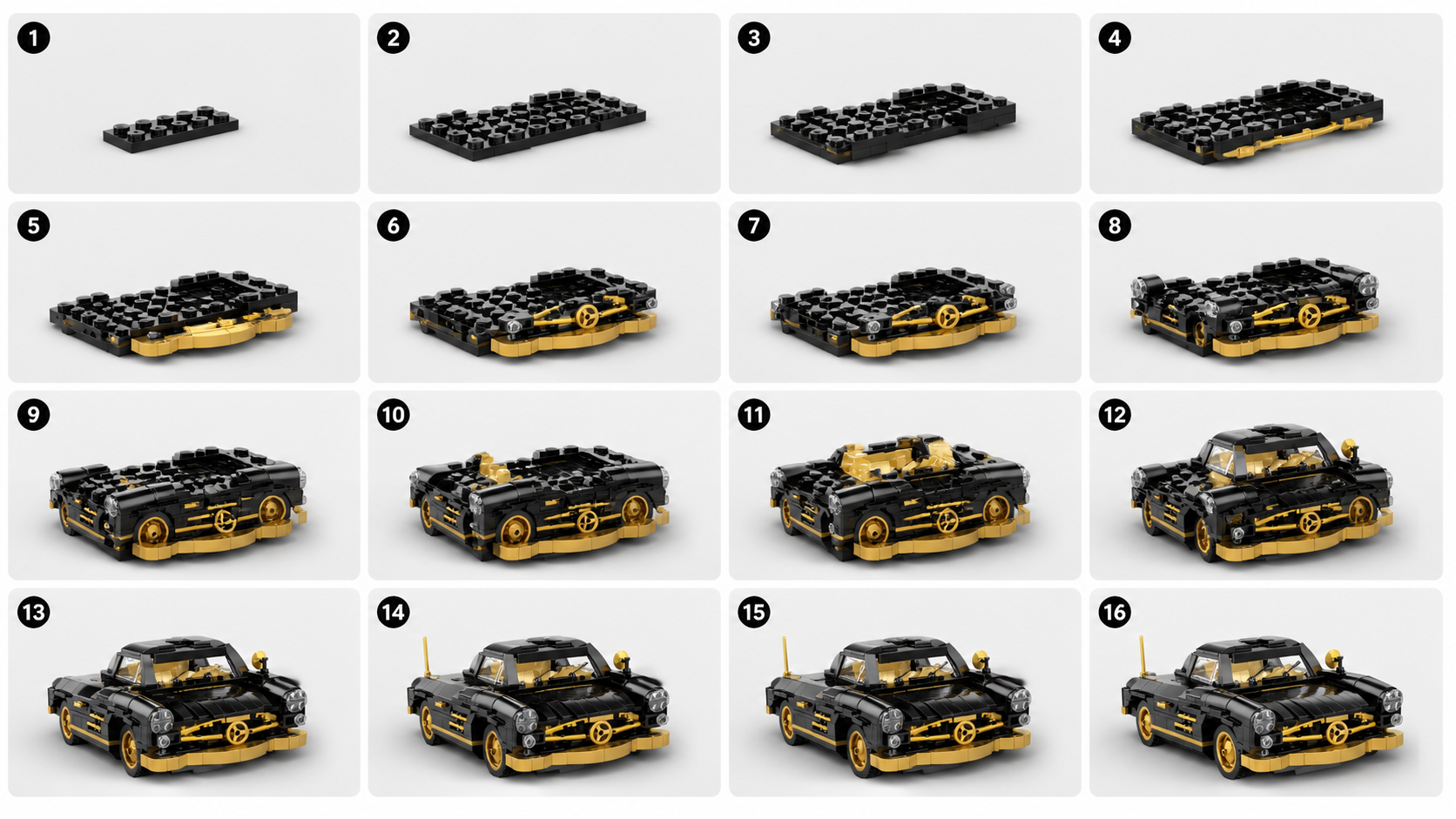
The animation side of BrickGPT is not a generic video editor. It is an assembly video maker built around the same creator loop as the board: one finished model image in, one clearer sequence out, then one short front-view motion clip ready to share.

Front-view motionThe output is optimized as a simple, readable front-view assembly clip instead of a noisy cinematic montage.
Same source, two assetsThe same source image supports both the board and the final motion output, which keeps the story consistent.
Useful for distributionThe assembly clip is built for product pages, creator posts, demos, and social sharing where motion improves comprehension.
Workflow Page

Assembly Video Maker For Brick Model Presentation

BrickGPT can turn one finished model image and a generated steps board into a short front-view assembly video for demos, product pages, and creator posts.

Why an assembly video matters

A steps board explains the build in static form, but motion helps validate the sequence emotionally and visually. Users can scan the progression faster when they also see a short assembly clip.

That makes the final animation useful as more than a novelty. It becomes part of the product explanation layer.

What BrickGPT's video maker is optimized for

The target output is a short front-view assembly motion, not a long-form editor timeline. The value is clarity and shareability, not maximum editing flexibility.

This is why the workflow stays narrow. The same constraints that help the steps board also help the video remain readable and consistent with the uploaded model image.

Where this page fits in search intent

This page should attract users searching for assembly video maker, build animation workflow, or brick model motion presentation terms.

It also supports the broader story that BrickGPT is not only about static build steps. It is about turning one finished model image into a fuller build story with motion.

Related Guides

Supporting articles around the same workflow intent.

These guides expand the same search topic from prompt quality, source-image prep, and output usefulness angles.

AI Instruction Generator

What Makes An AI LEGO Instruction Generator Actually Useful

The useful version is not just a pretty collage. It is a tool that makes build order, model structure, and output clarity easier to understand.

Read the guide
AI Brick Generator Guide

AI Brick Generator Prompt Ideas For Cars, Mechs, And Architecture

Prompt structures that give an AI brick generator cleaner silhouettes, stronger model identity, and more buildable-looking outputs.

Read the guide
Adjacent Pages

Other narrow landing pages in the same BrickGPT search cluster.

These sibling pages target closely related but different landing intents, which helps search engines and users understand the full topic cluster.

AI LEGO Instruction Generator

AI LEGO Instruction Generator For One Finished Model Image

BrickGPT is an AI LEGO instruction generator workflow that turns one finished model image into a clearer steps board and a short front-view assembly video.

Open related workflow page
Image To Build Steps

Image To Build Steps Workflow For Brick Models

Use BrickGPT to turn one finished model image into a build-steps board and a final front-view assembly video without manual step design.

Open related workflow page
LEGO Instructions From Photo

LEGO Instructions From A Photo For Finished Brick Models

Use BrickGPT to turn one clear photo of a finished brick model into a stronger steps board and a short front-view assembly video.

Open related workflow page
Build Animation From Image

Build Animation From One Brick Model Image

Generate a short front-view build animation from one finished brick model image, with a supporting steps board created from the same source.

Open related workflow page
Photo To LEGO Instructions

Photo To LEGO Instructions From One Finished Model Shot

Turn one clear finished brick model photo into LEGO-style instructions and a short front-view assembly video with BrickGPT.

Open related workflow page
LEGO Build Steps From Image

LEGO Build Steps From One Finished Model Image

Use BrickGPT to turn one finished model image into LEGO build steps and a short front-view assembly clip from the same visual source.

Open related workflow page
Assembly Video From Photo

Assembly Video From A Brick Model Photo

Create an assembly video from one finished brick model photo, with a supporting steps board generated from the same image in BrickGPT.

Open related workflow page
Related Questions

Short answers that reinforce the same keyword fit.

The page intent stays narrow: one finished model image in, a clearer board out, and a short assembly clip out.

01What outputs do I get from BrickGPT?

One source image currently produces two presentation assets: a steps board and a final assembly video. The steps board usually shows 10 to 20 smaller build stages, and the video targets a short front-view assembly motion.

02Can BrickGPT create an assembly video?

Yes. After the build board is generated, BrickGPT can render a short assembly-style video from the same source image. The goal is a clean front-view motion clip for demos, product pages, social posts, and creator portfolios.

03Do I need to log in before using the generator?

Yes. The public landing page shows the product workflow and examples, but upload, board generation, video rendering, saved media, and downloads are protected behind login. This keeps generation APIs and user outputs private.

Next Step

Use a real model image and test the workflow end to end.

The support page explains the search intent. The studio is where that intent becomes an actual board and assembly video.

Assembly Video Maker For Brick Model Presentation | BrickGPT