BrickGPTBrickGPT
LEGO Build Steps From Image

A narrow LEGO build-steps-from-image workflow that stays readable.

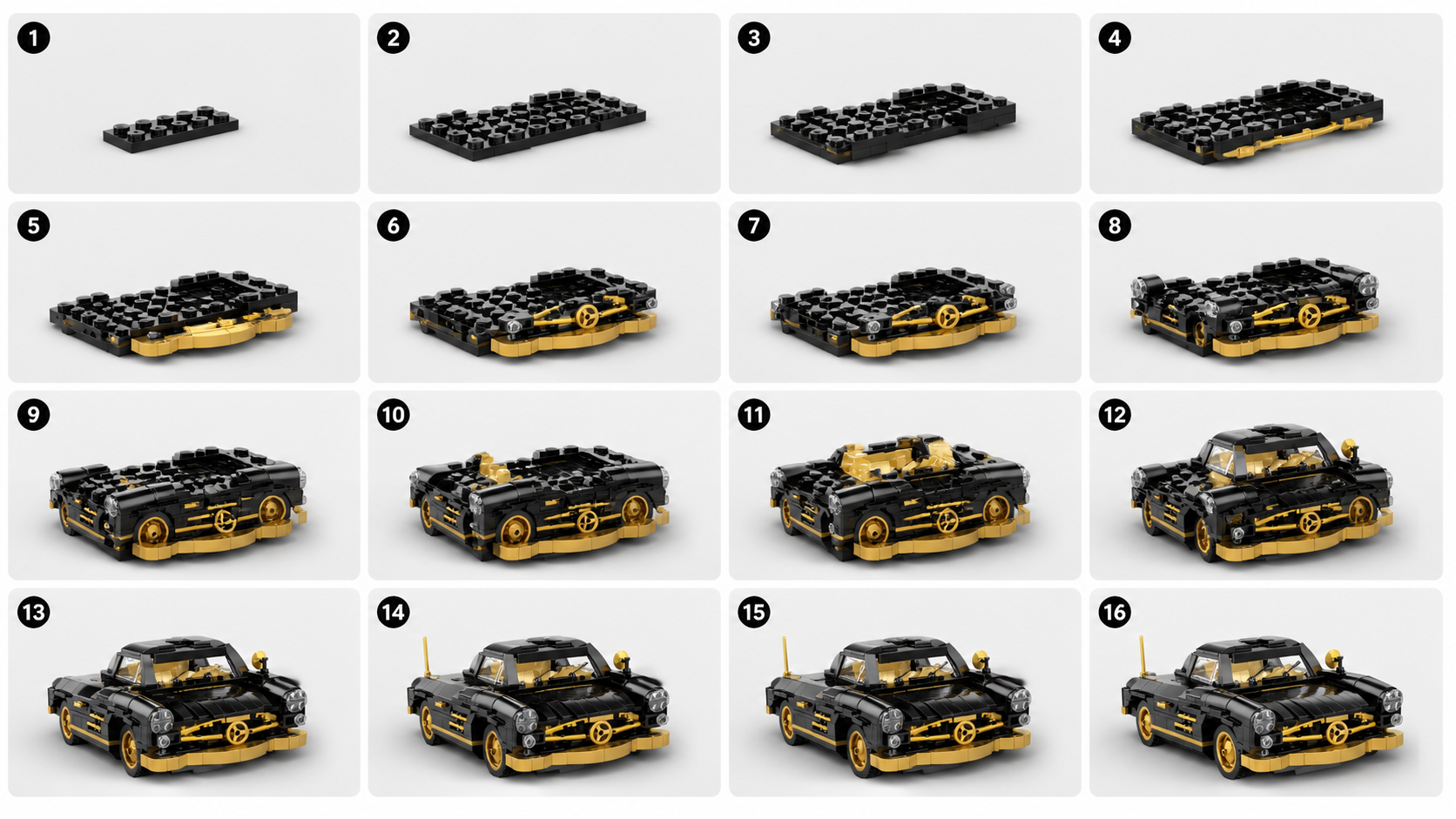
BrickGPT is strongest when the goal is not broad image generation but a tighter image-to-build-steps workflow. One finished model image becomes a cleaner steps board first, then a matching short motion output.

Sequence is the valueThe key output is not just a transformed render. It is a clearer progression from early structure to finished model.
One image can be enoughA strong finished model image already carries enough structure for BrickGPT to produce readable build steps.
Useful for presentationThe build-steps output is made for explanation, scanning, and sharing across product and creator surfaces.
Workflow Page

LEGO Build Steps From One Finished Model Image

Use BrickGPT to turn one finished model image into LEGO build steps and a short front-view assembly clip from the same visual source.

Why LEGO build steps from image is a good fit

Many users already have the finished model image and do not want to redraw every stage manually. BrickGPT uses that one image as the anchor for a more structured visual breakdown.

This is where the product promise stays clear: one image in, one stronger steps board out, and one short assembly video out.

What makes the steps easier to read

Readable outputs usually come from images with a clean silhouette, visible structural zones, and a composition where the subject occupies most of the frame.

If the system can separate the model into obvious visual construction regions, the steps board becomes much more useful as an explanation layer.

Search intent this page should capture

This page is aimed at users searching for LEGO build steps from image, brick build steps from photo, or one-image instruction workflows.

It is best for visitors who want a practical build-steps presentation asset rather than a generic AI art transformation.

Related Guides

Supporting articles around the same workflow intent.

These guides expand the same search topic from prompt quality, source-image prep, and output usefulness angles.

Image To Build Instructions

How To Turn One Model Image Into Build Instructions

A practical guide to preparing a single finished model image for better AI build instructions and a cleaner assembly video.

Read the guide
AI Instruction Generator

What Makes An AI LEGO Instruction Generator Actually Useful

The useful version is not just a pretty collage. It is a tool that makes build order, model structure, and output clarity easier to understand.

Read the guide
Adjacent Pages

Other narrow landing pages in the same BrickGPT search cluster.

These sibling pages target closely related but different landing intents, which helps search engines and users understand the full topic cluster.

AI LEGO Instruction Generator

AI LEGO Instruction Generator For One Finished Model Image

BrickGPT is an AI LEGO instruction generator workflow that turns one finished model image into a clearer steps board and a short front-view assembly video.

Open related workflow page
Image To Build Steps

Image To Build Steps Workflow For Brick Models

Use BrickGPT to turn one finished model image into a build-steps board and a final front-view assembly video without manual step design.

Open related workflow page
Assembly Video Maker

Assembly Video Maker For Brick Model Presentation

BrickGPT can turn one finished model image and a generated steps board into a short front-view assembly video for demos, product pages, and creator posts.

Open related workflow page
LEGO Instructions From Photo

LEGO Instructions From A Photo For Finished Brick Models

Use BrickGPT to turn one clear photo of a finished brick model into a stronger steps board and a short front-view assembly video.

Open related workflow page
Build Animation From Image

Build Animation From One Brick Model Image

Generate a short front-view build animation from one finished brick model image, with a supporting steps board created from the same source.

Open related workflow page
Photo To LEGO Instructions

Photo To LEGO Instructions From One Finished Model Shot

Turn one clear finished brick model photo into LEGO-style instructions and a short front-view assembly video with BrickGPT.

Open related workflow page
Assembly Video From Photo

Assembly Video From A Brick Model Photo

Create an assembly video from one finished brick model photo, with a supporting steps board generated from the same image in BrickGPT.

Open related workflow page
Related Questions

Short answers that reinforce the same keyword fit.

The page intent stays narrow: one finished model image in, a clearer board out, and a short assembly clip out.

01How does BrickGPT generate build instructions from one image?

The current workflow is intentionally simple: upload a finished model image, let BrickGPT create a visual build board, then render the same model into a share-ready assembly motion. The board is designed to show sequence and structure, not just a decorative collage.

02What kind of image should I upload?

Upload one clear image of a finished brick model. Product renders, box-style model photos, or clean front-view model images work best because the system needs enough visual detail to infer the build shape and output useful steps.

03What outputs do I get from BrickGPT?

One source image currently produces two presentation assets: a steps board and a final assembly video. The steps board usually shows 10 to 20 smaller build stages, and the video targets a short front-view assembly motion.

Next Step

Use a real model image and test the workflow end to end.

The support page explains the search intent. The studio is where that intent becomes an actual board and assembly video.

LEGO Build Steps From One Finished Model Image | BrickGPT