Finished model image
A clear finished model photo is the required input. Generation is available through a paid plan.
 BrickGPT
Upload one brick model photo. AI automatically creates a visual steps board and a short assembly video.
Explore the samples. No sign-in needed.
No sign-in required.
A clear finished model photo is the required input. Generation is available through a paid plan.
No exact parts list or CAD file is included. Review visual consistency before publishing.
Compare the public samples with the output you need before choosing a plan.
This is the full product path: prepare the brick-style source, create a clearer instruction board, then render the front-view assembly film.
A clear finished model photo is the required input. Generation is available through a paid plan.
No exact parts list or CAD file is included. Review visual consistency before publishing.
Compare the public samples with the output you need before choosing a plan.
Each path focuses on one practical result: instruction generation, image-to-steps output, photo preparation, or assembly video creation.
Compare AI visual LEGO instructions with buildable manuals. See a real steps board and video, check the limits, and follow the image-upload workflow.
Open this pathTurn a finished brick-model image into a visual steps board. Learn how to review panel order, visible changes, orientation and legibility before sharing.
Open this pathMake an AI assembly video from a finished brick-model photo. Preview a real clip, understand the board-to-video workflow and check the result before download.
Open this pathTrying to rebuild a LEGO model from a photo? Identify an official set, find a custom designer, or gather the views needed to make and test your own instructions.
Open this pathCheck an AI brick-build animation for morphing pieces, camera drift and unexplained jumps. Learn what to fix in the source image and when another method fits.
Open this pathPrepare a finished LEGO-model photo for an AI steps board and assembly video. Check framing, upload formats, output quality and the limits of one image.
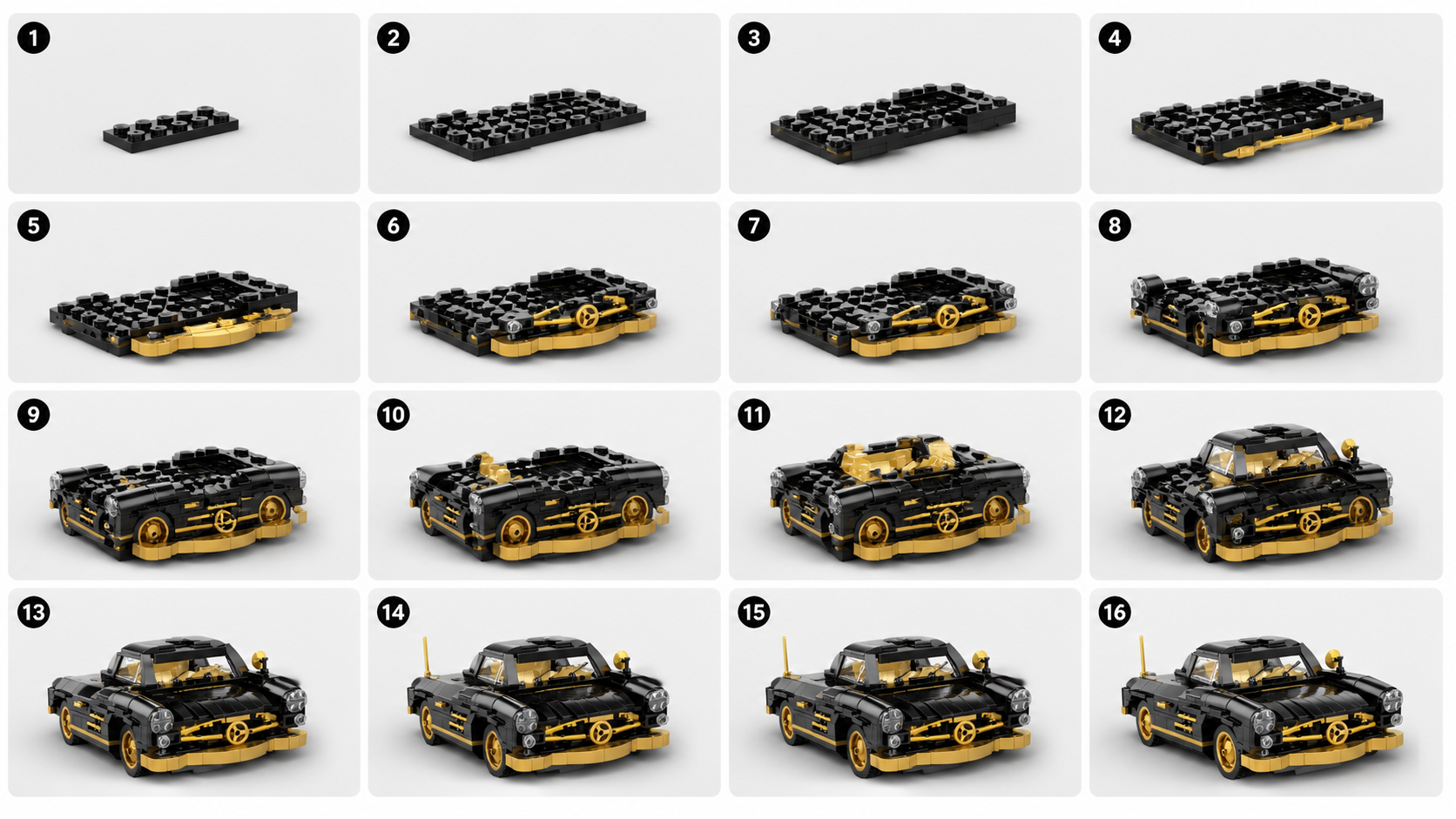
Open this pathReview an AI LEGO steps board using a real 16-panel sample. Spot unexplained jumps, repeated panels and hidden connections before using it as a guide.
Open this pathPrepare an AI brick-model assembly clip for a product page or social post. Plan the sequence, protect the framing, add useful context and check the final export.
Open this pathUse the creation paths for product details, the gallery for output proof, the blog for practical guidance, and the FAQ for short answers.
No exact parts list or CAD file is included. Review visual consistency before publishing.
Choose an instruction workflowCompare the public samples with the output you need before choosing a plan.
ExamplesChoose a guide for the job you need to finish: prepare an image, write a prompt or check whether instructions are buildable.
Related guidesA clear finished model photo is the required input. Generation is available through a paid plan.
FAQAll plans are monthly subscriptions. After login, you will be sent directly to Stripe for secure payment.
All prices are in USD.
For solo creators testing complete board and video output.
For creators and marketers with recurring product-story output needs.
For product teams running repeated creator, listing, or campaign workflows.
A compact vehicle example showing the full loop from source model to board and final motion.
A second vehicle case that keeps the same build language with a different silhouette and palette.
A cleaner cropped motion export with no background music.
A wider composition that still fits the same build-story pipeline.
Check the sample files, then choose a plan when the format suits your project. Sign in to generate and download your own results.
Find answers about the output, costs and account steps before choosing a plan.
Upload a finished brick-model image to create an AI visual steps board and an assembly-style video. The studio creates the board first, then the video in the same workflow. These are presentation assets; they do not include a CAD file or an exact parts inventory.
The generated images do not verify hidden connections, exact parts or physical buildability. If you need instructions for real bricks, use an official manual or a checked digital model and test the sequence. A convincing picture is not evidence that a connection works.
You can view the public source images, enlarge and download the sample boards, and play the sample videos without signing in. Generating your own results requires an account with a plan or available credits. The public sample gallery is not a free generation trial.
Use one JPG, PNG or WebP image of a finished brick model. Keep the whole model visible with a clear outline, enough light and little background clutter. A pile of parts, several models or a cropped subject does not provide the same reference.
The two complete public model examples currently have 4.3-second video files and 16-panel boards. These describe the sample files, not a guaranteed duration or panel count for new generations. The studio requests an approximately 15-second video, but actual output and completion time can vary; inspect the returned file.
Sign in with the email used for the subscription, open your account and then the billing portal. The portal lets you manage payment details, invoices and renewal. Follow its cancellation confirmation and check the effective date; closing the website or signing out does not cancel a subscription.