BrickGPTBrickGPT
BrickGPT Creator Platform
Turn one finished model image into a build board and a share-ready video.

Turn Finished Models
Into Brick Build Stories

Upload once. BrickGPT turns the same image into a cleaner step board and a front-view assembly video.

Creator promiseOne finished model image becomes a clearer board and a tighter final film.
First versionUpload, wait, preview, download.
No prompt tuning. No extra controls.Just upload the finished model image and wait for the board and video.
Open Studio
Upload one finished model imageGet the steps board and final video
3core tools
10-20visual build steps
15 secassembly video
Creator LoopModel, instructions, and final motion
Front-view assembly outputOne image in, two polished assets out
Instructions
Animation
Workflow
1Idea
2Brick Model
3Instructions
SourceSingle model image upload
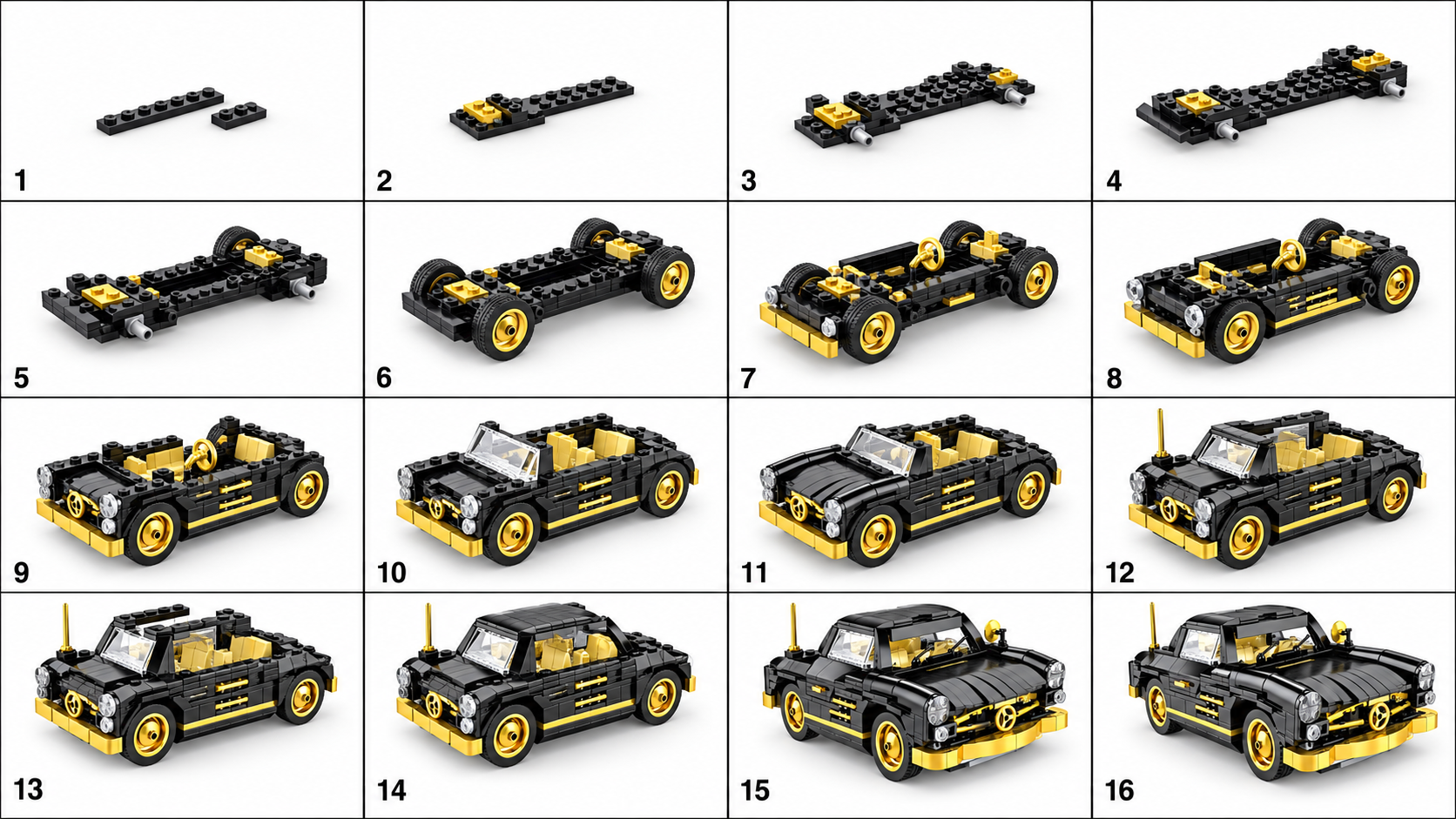
Board10-20 smaller build stages
Video15-second front assembly motion
What BrickGPT Does

BrickGPT is an AI brick instruction and animation workflow. A user uploads one finished brick model image, then BrickGPT generates a cleaner visual build board and a short front-view assembly video from the same source image.

Who It Is For

BrickGPT is for creators, toy marketers, collectors, and product storytellers who want to turn a finished brick render into a more explainable, more shareable output without writing prompts or editing video by hand.

Current Output Format

The current BrickGPT output format is narrow by design: one source image in, one steps board out, and one final assembly video out. The board usually shows 10 to 20 smaller build stages, and the video targets a short 15-second front-view assembly motion.

Looking For LEGO GPT Download?

BrickGPT is an independent browser-based workflow, not an official LEGO product or a downloadable LEGO GPT app. Sign in, upload one finished brick model image, then generate and download your own build board and assembly video outputs.

Core Workflow

One model image becomes a board and a video.

This is the full product path: prepare the brick-style source, create a clearer instruction board, then render the front-view assembly film.

01
AI Brick Generator

Generate

Turn one concept image into a cleaner brick-style model foundation for the rest of the workflow.

02
Instruction Generator

Build

Break the finished model into a presentable build board with many smaller, clearer assembly stages.

03
Animation Generator

Animate

Render a short front-view assembly film that is ready for demos, product pages, and social sharing.

Intent Paths

Direct workflow pages for the main non-brand searches.

These support pages narrow the promise around instruction generation, image-to-steps workflow, and assembly-video output so search traffic has clearer landing paths.

AI LEGO Instruction Generator

AI LEGO Instruction Generator | Build Steps From Photos

Create LEGO-style instructions from a clear photo of a finished brick model. BrickGPT produces a visual build-steps board and a short assembly video.

Open this workflow page
Photo To LEGO Instructions

Photo To LEGO Instructions From One Finished Model Photo

Turn a clear finished brick-model photo into LEGO-style visual build steps and a short assembly video with BrickGPT.

Open this workflow page
AI LEGO Build From Image

AI LEGO Build Steps From Image | Visual Instructions

Use BrickGPT to turn one finished model image into AI LEGO build steps, instruction-style boards, and a short front-view assembly clip.

Open this workflow page
Assembly Video Maker

Assembly Video Maker For Brick Model Presentation

BrickGPT can turn one finished model image and a generated steps board into a short front-view assembly video for demos, product pages, and creator posts.

Open this workflow page
Answer System

One search cluster, reinforced by five answer surfaces.

The support pages narrow intent, the gallery proves output, the blog explains workflow details, and the FAQ handles short-form search questions.

Cluster Center

AI LEGO instruction generator landing page

This is the tightest commercial-intent page for BrickGPT's one-image workflow and the page the rest of the cluster should keep reinforcing.

Open cluster center
Output Proof

Examples that prove the workflow already works

The gallery shows source image, steps board, and final motion output together so search visitors can verify the product promise quickly.

Open examples
Guides

Blog guides that explain prompts, photos, and output quality

The guide layer expands the same cluster from source-image prep, prompt quality, and instruction usefulness angles instead of opening a new topic.

Open guides
Direct Answers

FAQ answers that match the same workflow intent

The FAQ page keeps short answers around login, uploads, outputs, and limits tightly connected to the same one-image workflow.

Open FAQ
Verified Download Intent

Looking for a LEGO GPT download? Start with the browser workflow.

The download guide answers this distinct query safely, then routes visitors to the same image-to-steps workflow rather than promising an unverified installer.

Read download guide
Subscription Plans

Choose a plan for the models you want to turn into boards and videos.

Every plan opens the same private workflow: upload a finished model image, generate both outputs, then save and download them. Starter is the simplest way to complete your first real model.

Starter

$12

/month

For solo creators validating image-to-board output quality.

Single-user accessImage upload and generation historySelf-serve monthly subscription
Pro

$29

/month

For creators and marketers who need more recurring generation volume.

Higher generation allowancePriority supportSelf-serve monthly subscription
Team

$79

/month

For product teams that want structured creator workflows and shared output review.

Team workflow planningShared review processSelf-serve monthly subscription
Output Gallery

Generated boards, final videos, and motion samples in one place.

Editorial picks from the same workflowComplete output cases and motion samples now sit in one gallery, so the product story is easier to scan.
Open Output Gallery
Example 01

Red Coupe

A compact vehicle example showing the full loop from source model to board and final motion.

Single source image
10-20 build stages
15s assembly film
Input
Board
15s build animation
Example 02

Blue Racer

A second vehicle case that keeps the same build language with a different silhouette and palette.

Single source image
10-20 build stages
15s assembly film
Input
Board
15s build animation
Motion exports built for product storytellingAdditional front-view motion pieces now live inside the same output gallery.
View Motion Samples
Motorbike motion sample

Zhangxue Motorbike

A cleaner cropped motion export with no background music.

Wide product motion

Xiaomi SU7

A wider composition that still fits the same build-story pipeline.

Protected Studio

Open the studio when you are ready to generate.

The landing page explains the workflow and examples. Uploading images, generating boards, rendering videos, saved media, and downloads are available after email login.

Email login required
Upload after sign-in
Private saved outputs
BrickGPT FAQ

Direct answers for AI search and real creators.

Short answers cover the key product intent: one image in, one steps board out, and one front-view assembly video out.

AI brick instruction generatorimage to build stepsassembly video maker
01What is BrickGPT?

BrickGPT is an AI brick instruction and animation workflow. It turns one finished brick model image into a cleaner instruction-style board and a short front-view assembly video, so creators can explain and share a build without manually designing every step.

02How does BrickGPT generate build instructions from one image?

The current workflow is intentionally simple: upload a finished model image, let BrickGPT create a visual build board, then render the same model into a share-ready assembly motion. The board is designed to show sequence and structure, not just a decorative collage.

03What kind of image should I upload?

Upload one clear image of a finished brick model. Product renders, box-style model photos, or clean front-view model images work best because the system needs enough visual detail to infer the build shape and output useful steps.

04What outputs do I get from BrickGPT?

One source image currently produces two presentation assets: a steps board and a final assembly video. The steps board usually shows 10 to 20 smaller build stages, and the video targets a short front-view assembly motion.

05Is BrickGPT an AI LEGO instruction generator?

BrickGPT is built for brick-style models and instruction-style outputs. It is best described as an AI brick instruction generator and animation workflow: it helps turn a finished model image into a clearer visual build story.

06Can BrickGPT create an assembly video?

Yes. After the build board is generated, BrickGPT can render a short assembly-style video from the same source image. The goal is a clean front-view motion clip for demos, product pages, social posts, and creator portfolios.

07Do I need to write prompts or edit video manually?

No prompt field is required in the current studio flow. BrickGPT is designed around a narrow one-image workflow so users can upload, wait, preview, and download without prompt tuning or manual video editing.

08Is BrickGPT a LEGO GPT download?

No. BrickGPT is an independent browser-based AI brick instruction workflow, not an official LEGO product or a downloadable LEGO GPT app. Sign in to upload a finished model image, then generate and download the resulting build board and assembly video.

09What is a LEGO GPT alternative?

A LEGO GPT alternative is a browser-based tool for brick-related creative work that does not require installing unknown software. BrickGPT is an independent web app: after sign-in, upload one finished brick model image to create a visual steps board and a short assembly video.

10How do I use BrickGPT instead of downloading LEGO GPT?

Open BrickGPT in a browser, sign in, and upload one clear JPG, PNG, or WebP image of a finished brick model. The workflow creates a steps board and assembly video from that source image; you can then preview and download your own outputs without installing an unknown app.

11Do I need to log in before using the generator?

Yes. The public landing page shows the product workflow and examples, but upload, board generation, video rendering, saved media, and downloads are protected behind login. This keeps generation APIs and user outputs private.

12What file formats and limits are supported?

The current studio supports JPG, PNG, and WebP source uploads. The product scope is deliberately narrow: one finished model image in, one steps board out, and one final front-view assembly video out.

13What does BrickGPT not do yet?

BrickGPT is not trying to be a general-purpose image generator, CAD editor, or full instruction-authoring suite. The current version focuses on a compact creator workflow: one finished brick model image becomes a board and a video.

BrickGPT: AI LEGO Instruction Generator & LEGO GPT Alternative