BrickGPTBrickGPT
Image To LEGO Generator

Turn a picture into a LEGO-style image.

This is the fast entry point for image-to-LEGO, LEGO picture maker, LEGO art generator, AI LEGO characters, and LEGO minifigure generator searches. Upload a photo, character image, object, vehicle, pet, or product shot and create a polished brick-style visual before moving into build steps or animation.

Any picture inputStart from a person, pet, car, building, product, or existing toy photo instead of writing a long prompt.
LEGO-style outputGenerate a brick-art image that preserves the main subject while making it feel like a clean toy-style build.
Next-step workflowUse the result as a stronger source image for BrickGPT's instruction board and assembly video workflow.
Workflow Page

Image To LEGO Generator | LEGO Picture Maker Online

Use this image to LEGO generator to turn a picture into LEGO-style art, character concepts, minifigure-style portraits, and brick visuals online.

What image to LEGO means here

Most users searching image to LEGO or LEGO picture maker do not want a long article first. They want to upload an image and quickly see whether the subject can become a brick-style visual.

BrickGPT answers that intent with a narrow image transformation step: keep the subject recognizable, simplify the form into toy-like brick shapes, and produce a cleaner source image for later instruction or video generation.

Use cases this page should capture

The same tool can support LEGO art generator, AI LEGO characters, turn picture into LEGO character free, LEGO minifigure generator, and LEGO maker style searches because the first user action is the same: upload a picture and generate a brick-style image.

For people searching LEGO 3D builder, BrickGPT should be positioned carefully as a 3D-style visualizer and creator workflow, not as an official CAD builder or official LEGO Builder replacement.

How it connects to build steps and video

A cleaner LEGO-style source image can make the later build board easier to read because the subject already has simplified shapes, stronger color blocks, and less background noise.

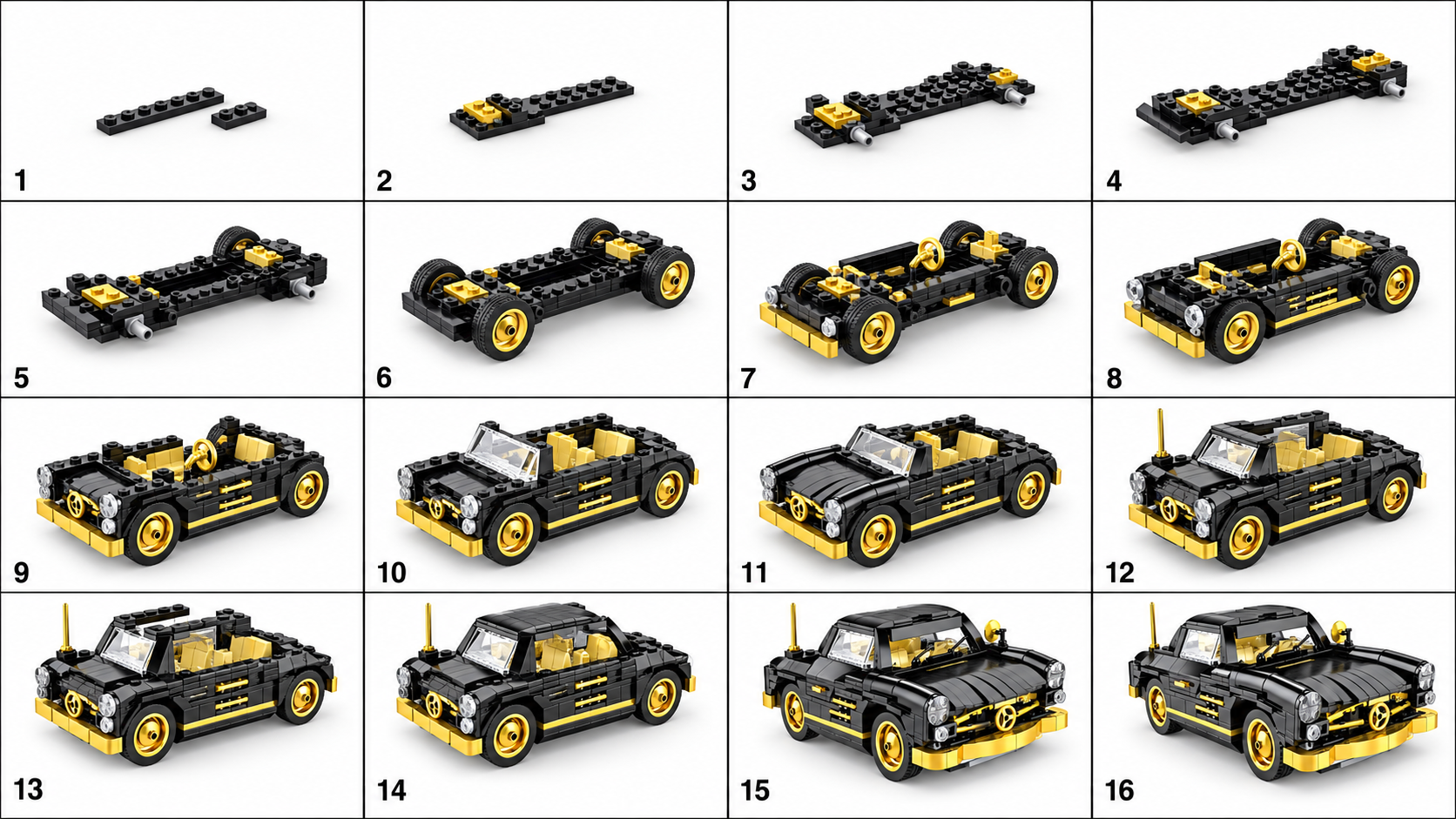
After generating the LEGO-style image, users can continue into BrickGPT's instruction workflow to create a visual steps board and a short assembly video from the same concept.

Picture, photo, and character inputs

Use this entry when the starting point is a picture rather than a written prompt. That includes picture to LEGO, photo to LEGO, AI LEGO character, LEGO minifigure generator, pet-to-brick, vehicle-to-brick, and product-shot-to-brick-style searches.

If the visitor wants instructions instead of a stylized image, route the same source into the photo-to-LEGO-instructions or AI LEGO instruction generator workflow so the output becomes a board and video, not only a picture.

Independent tool disclaimer

BrickGPT is an independent AI brick-creation tool. LEGO is a trademark of the LEGO Group, which does not sponsor, authorize, or endorse this site.

The output is a LEGO-style creative image for visualization, creator content, and product storytelling. It is not an official set, official instruction file, or guaranteed buildable parts inventory.

Related Guides

Supporting articles around the same workflow intent.

These guides expand the same search topic from prompt quality, source-image prep, and output usefulness angles.

AI Brick Generator Guide

AI Brick Generator Prompts for Cars, Mechs & Architecture

Prompt structures that give an AI brick generator cleaner silhouettes, stronger model identity, and more buildable-looking outputs.

Read the guide
Image To Build Instructions

How To Turn One Model Image Into Build Instructions

A practical guide to preparing a single finished model image for better AI build instructions and a cleaner assembly video.

Read the guide
AI Instruction Generator

What Makes An AI LEGO Instruction Generator Actually Useful

The useful version is not just a pretty collage. It is a tool that makes build order, model structure, and output clarity easier to understand.

Read the guide
Core Pages

Other core landing pages in the same BrickGPT search cluster.

These pages stay inside the same one-image workflow and help search engines understand BrickGPT's main instruction, steps, photo, and motion intents.

AI LEGO Instruction Generator

AI LEGO Instruction Generator | Photo To Build Steps

Use this AI LEGO instruction generator to turn one photo into LEGO-style build steps, a visual instruction board, and an assembly video in BrickGPT.

Open related workflow page
Photo To LEGO Instructions

Photo To LEGO Instructions Generator | Build Steps

Turn a model photo into LEGO-style instructions online. BrickGPT converts one image into AI build steps, a board, and a short assembly video.

Open related workflow page
AI LEGO Build From Image

AI LEGO Build Steps From Image | Visual Instructions

Use BrickGPT to turn one finished model image into AI LEGO build steps, instruction-style boards, and a short front-view assembly clip.

Open related workflow page
Assembly Video Maker

Assembly Video Maker For Brick Model Presentation

BrickGPT can turn one finished model image and a generated steps board into a short front-view assembly video for demos, product pages, and creator posts.

Open related workflow page
Related Questions

Short answers that reinforce the same keyword fit.

The page intent stays narrow: one finished model image in, a clearer board out, and a short assembly clip out.

01Is BrickGPT a LEGO GPT download?

No. BrickGPT is an independent browser-based AI brick instruction workflow, not an official LEGO product or a downloadable LEGO GPT app. Sign in to upload a finished model image, then generate and download the resulting build board and assembly video.

02What is a LEGO GPT alternative?

A LEGO GPT alternative is a browser-based tool for brick-related creative work that does not require installing unknown software. BrickGPT is an independent web app: after sign-in, upload one finished brick model image to create a visual steps board and a short assembly video.

03How do I use BrickGPT instead of downloading LEGO GPT?

Open BrickGPT in a browser, sign in, and upload one clear JPG, PNG, or WebP image of a finished brick model. The workflow creates a steps board and assembly video from that source image; you can then preview and download your own outputs without installing an unknown app.

04Can I turn a picture into a LEGO-style character or minifigure?

Yes. The image-to-LEGO entry can turn a portrait, character, pet, vehicle, object, or product photo into a LEGO-style visual. For best results, use a clear subject, simple background, and enough visible shape for the generator to preserve the character or object identity.

Other Answer Surfaces

The same workflow intent also lives in examples, blog guides, and FAQ answers.

This keeps each support page inside a tighter answer system instead of acting like an isolated landing page.

Examples

See output proof for the same one-image workflow.

The gallery shows source image, steps board, and final motion together so visitors can verify the promise fast.

Open examples
Blog

Read guides that explain source images, prompts, and output quality.

The blog layer expands this page's search topic without drifting away from BrickGPT's current workflow cluster.

Open guides
FAQ

Use the FAQ page for short-form answers around login, uploads, outputs, and limits.

That page strengthens the same topic cluster with concise answers instead of adding another near-duplicate landing page.

Open FAQ
Next Step

Use a real model image and test the workflow end to end.

The support page explains the search intent. The studio is where that intent becomes an actual board and assembly video.

Image To LEGO Generator | LEGO Picture Maker Online | BrickGPT