
LEGO Storytelling Lesson Plan: Build, Sequence and Explain
Use a small brick scene to make story sequence visible. In this suggested 45-minute lesson, pairs build a character and a place, photograph three changes and explain how the ending follows from the problem. The lesson is designed for classroom adaptation; it does not require an account, an AI tool or a special LEGO kit.
Choose one teaching goal before choosing the model
The goal is a clear beginning, problem and ending. A model can be simple: a figure on a bridge, an animal beside a shelter, or a delivery vehicle with a blocked road. What matters is whether the learner can connect the events. A beautiful model with no causal explanation does not yet meet this particular goal.
For an initial lesson, offer the prompt “Someone needs to get somewhere, but something is in the way.” Ask learners to name who, where and what changes. If your class is working on oral language rather than writing, let the teacher or a partner record the explanation. Adapt the vocabulary and number of events to your learners.
Prepare enough structure without scripting the answer
Each pair needs a handful of age-appropriate bricks, a small building area and the three-panel worksheet. A camera is optional. You can sketch the scenes instead of photographing them. Keep the number of characters small enough that learners can explain the sequence within the available time.
Before class, build a deliberately simple example and leave a gap in its explanation: “The bridge was blocked. Then our character arrived.” Ask what the listener still needs to know. This demonstrates the missing causal step without giving the class a polished story to imitate.
Run the 45-minute lesson
The following timings are a practical starting point, not an evidence-based dosage. Adjust them after observing your class. Keep the final discussion in the plan even if some models remain unfinished.
↔ Scroll sideways to read all columns
| Time | Teacher move | Learner output |
|---|---|---|
| 0–5 min | Model a story with one missing event | Identify what the listener cannot infer |
| 5–10 min | Choose a character, place and obstacle | Say the starting situation aloud |
| 10–25 min | Build and change three scenes | Make a beginning, a problem and an ending |
| 25–35 min | Swap storyboards with another pair | Find one unclear connection |
| 35–45 min | Revise and share | Explain the change and what made it clearer |
Capture three scenes that stay comparable
Place the camera on a stable surface and mark where the model sits. Keep the same character visible in every scene. Change the action or obstacle, then take the next photo. If the whole scene is rebuilt between frames, the audience may not know which character or object is continuing the story.
This is a three-image storyboard, not a stop-motion film. There is no need to shoot dozens of frames or learn editing software during the lesson. If time is short, keep the model fixed and point to a sketch showing the change. The worksheet gives learners room for a drawing or photo and a short sentence under each scene.
Download the three-scene storyboard (PDF) ↓
- Beginning: show who is present, where they are and what they want.
- Problem: change one visible condition that stops the character.
- Ending: show an action that responds to that problem, not an unrelated new event.
Use partner feedback that leads to a revision
Ask the listener to retell the story using only the pictures. The builder listens without correcting them immediately. Any mismatch is useful evidence of a missing clue. Ask the pair to fix one clue: reposition a character, show the obstacle more clearly or add a sentence explaining the action.
Use descriptive feedback instead of scoring artistic skill. “I can see the blocked road, but I cannot see how the vehicle gets past it” gives a learner something to change. “Make it more creative” does not. Photograph the before and after version if you want a record of the revision.
- Sequence: can a partner put the scenes in a sensible order?
- Cause: can the learner explain why the ending follows the problem?
- Evidence: can the learner point to a detail that supports the explanation?
- Revision: can the learner name one change made after feedback?
Adapt the same task for different learners
For learners who need more support, use two scenes and the sentence frames “First…” and “Then…”. Offer a small choice of characters or obstacles. Let learners rehearse with a partner before presenting to the class.
For learners who need a greater challenge, keep the same model but ask for an alternative ending that still follows logically. Another option is to remove all written captions and see whether the visual sequence is understandable. Neither extension requires a bigger or more expensive collection of bricks.
Optional extension: compare evidence with an AI interpretation
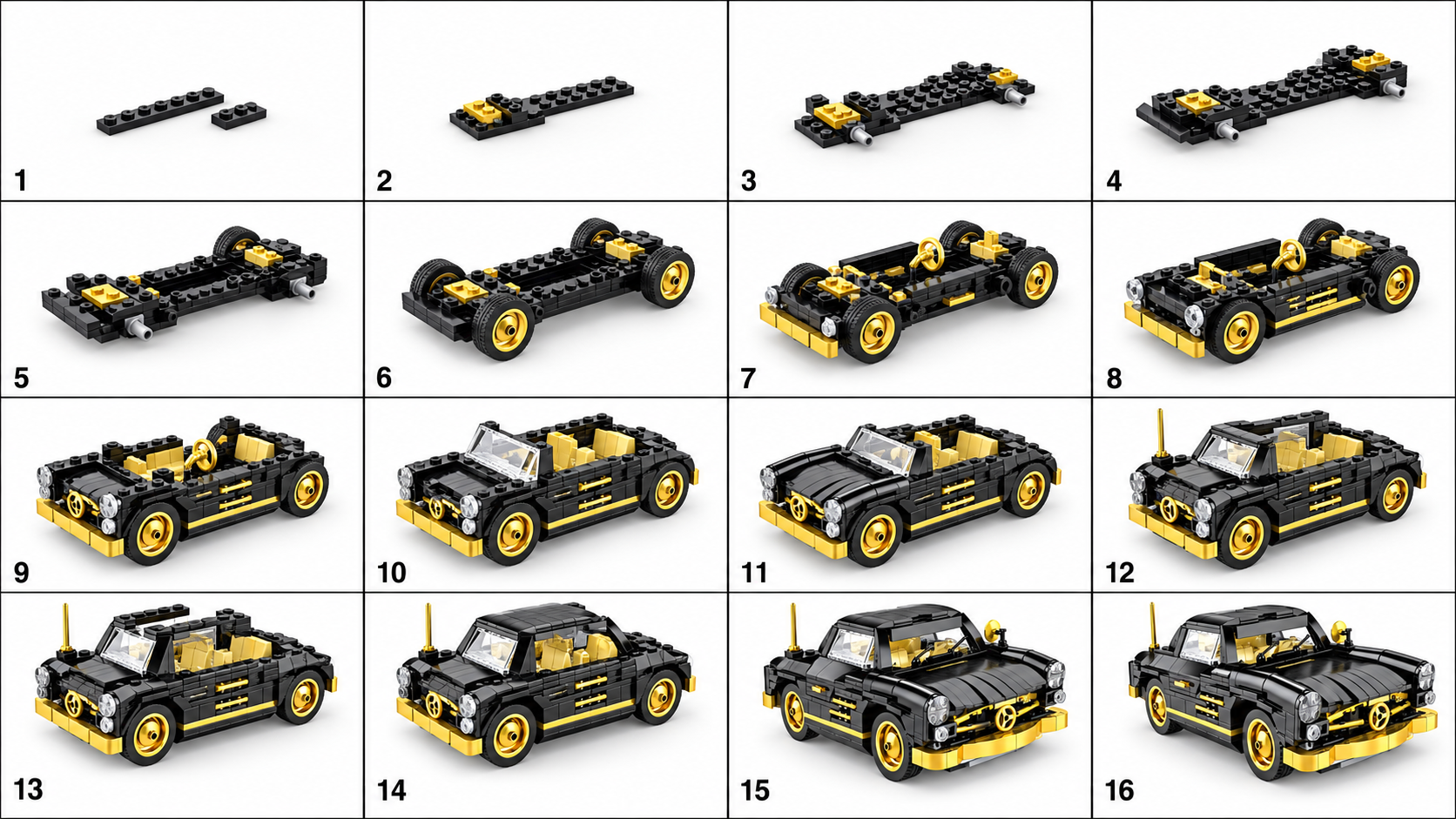
After the physical story is complete, an adult may show a BrickGPT example. The product takes one finished model image and creates a visual steps board and a short assembly-style clip. It does not automatically combine the class’s three photos into a narrative movie. Keep that distinction clear when selecting a tool.
Ask learners to compare the source photo with the generated board and video. Which visible features remain? What seems invented? Could a viewer mistake the clip for footage of a real build? The example below is a product sample, not classroom evidence. It can support a discussion about representation without uploading student work or buying a plan.
If the goal is an accurate record of students moving their own models, photograph those changes and use a conventional slideshow or stop-motion editor. Choose the output that serves the lesson, and preserve the original photos as the evidence.
Explore sample outputs
No sign-in required.
Questions teachers often ask
Do students need individual accounts? No. The core lesson uses bricks and paper; any optional product demonstration can be adult-led. Do all learners need the same pieces? No, because the assessment concerns sequence and explanation, not replication of one model. Should you grade the video? Assess the learner’s explanation and revision; a generated clip is not a measure of the learner’s building skill.
Sources and further preparation
This is an original teaching outline for adaptation, not a certified curriculum or a claim of improved test scores. Consult LEGO Education’s official library for lessons tied to particular education products and age groups. For a longer informal session, use the club workshop run sheet.